利用 MITM 获取 LLM 应用的提示词

我的 token 都到哪里去了?

自从 2022 年底 OpenAI 发布 ChatGPT 到现在已经过去了三年多的时间,在这期间涌现出了海量的基于大语言模型的框架和应用,我用过的有 LangChain、Dify、OpenWebUI 等等,还有最近的 OpenClaw。这些应用都允许设置第三方的模型 API 接口,我们可以选择自己的服务商和模型进行使用。

不知你是否好奇过,这些应用是如何使用提示词的?大部分项目都是开源的,去看源代码固然是可以,但跟代码实在是有点累了;一些面向开发者的应用比如 Dify 会有很完整的调用记录,但也不是所有应用都这么方便。所以最方便的办法还是抓包,毕竟所有的请求最终还是通过网络发出去的。

部署

代理 LLM 请求

new-api 是 OpenAI 接口的管理和分发系统。它可以管理各种主流的国内外大模型,提供一个统一的入口。你需要将其他平台的 API Key 保存在上面,然后用 new-api 提供的 OpenAPI 接口来调用。这样不但能统一保管所有渠道的密钥,还有统一的入口来让我们进行代理。

mitmproxy 是一个 HTTP 抓包工具,这里主要是用了它的反向代理和可视化 Web 页面的功能。配置反向代理,让访问 mitmproxy 端口的请求转发到 new-api,经过 mitmproxy 的数据包会被捕获,显示在页面上。这样我们就看到了完整的接口请求和响应,也就是提示词和模型生成结果。

Nginx 是所有流量的入口,可以将请求转发给抓包工具或者是分发工具。平时都直接转发给 new-api,只有有抓包需要的时候,才转发给 mitmproxy。

配置

除了要准备上述的软件包 / 镜像之外,最好是还有一台能够长期运行,并且公网可以访问的主机。

Docker

建议安装 Docker,下面的服务都使用 Docker 配置。

1
2
curl -fsSL https://get.docker.com -o install-docker.sh
sudo sh install-docker.sh

new-api

参考官方部署文档

默认配置监听端口 3000

mitmproxy

把命令保存到 reverse.sh 脚本中,方便下次执行。

1
2
3
4
5
docker run -it --rm --network=host --name mitmproxy-8777 mitmproxy/mitmproxy \
mitmweb --mode reverse:http://localhost:3000 \
--web-host 0.0.0.0 --web-port 8778 \
--listen-port 8777 \
--set block_global=false

执行这个命令会开启一个一次性的容器,监听 8777 端口提供反代服务,所有访问该端口的 HTTP 请求都会被转发到 3000 端口(new-api),然后 mitmproxy 会记录请求内容。

--web-port 指定通过 8778 端口打开网页查看捕获的数据包。

Nginx

使用 Nginx 的备份服务器(backup server)功能,设置 mitmproxy 地址为主服务器,new-api 的地址为备份服务器。在想要抓包的时候启动 mitmproxy 服务,流量就会自动切换过来。

1
2
3
4
5
6
7
8
9
10
11
12
upstream backend {
server localhost:8777; # mitmproxy 反代端口
server localhost:3000 backup; # new-api 端口
}

server {
listen 80;
server_name napi.beanbang.cn;
location / {
proxy_pass http://backend;
}
}

试试看!

让我们来试试抓取最近很火的 OpenClaw 的提示词。

配置模型

这里使用 MiniMax-M2.5 模型,在 new-api 的渠道管理页面选择对应渠道,填入申请好的 API 密钥。

在 OpenClaw 的机器上用 openclaw config 来配置模型,选择 Model -> Custom Provider,输入自己的服务入口地址和 new-api 生成的令牌。

也可以直接修改配置文件的 model 对象:

1
2
3
4
5
6
7
8
9
10
11
12
13
14
15
16
17
18
19
20
21
22
23
24
25
26
27
28
29
30
{
"models": {
"mode": "merge",
"providers": {
"custom-beanbang-cn": {
"baseUrl": "http://napi.beanbang.cn/v1",
"apiKey": "sk_test_P7x2Lq9Zk3T1sM6Vd8NfB4aHc0R5YwJ",
"api": "openai-completions",
"models": [
{
"id": "MiniMax-M2.5",
"name": "MiniMax-M2.5 (Custom Provider)",
"reasoning": false,
"input": [
"text"
],
"cost": {
"input": 0.3,
"output": 1.2,
"cacheRead": 0.03,
"cacheWrite": 0.375
},
"contextWindow": 16000,
"maxTokens": 16000
}
]
}
}
}
}

开启 MITM

启动 mitmproxy:

1
2
3
4
5
6
7
8
9
10
11
$ cat reverse.sh 
docker run -it --rm --network=host --name mitmproxy-8777 mitmproxy/mitmproxy \
mitmweb --mode reverse:http://localhost:3005 \
--web-host 0.0.0.0 --web-port 8778 \
--listen-port 8777 \
--set block_global=false

$ sh reverse.sh
[15:59:40.258] reverse proxy to http://localhost:3005 listening at *:8777.
[15:59:40.300] Web server listening at http://0.0.0.0:8778/?token=0394251daef76e6101cf1fa1e3aaecdc
...

用浏览器打开日志输出的地址进入页面等待抓包。

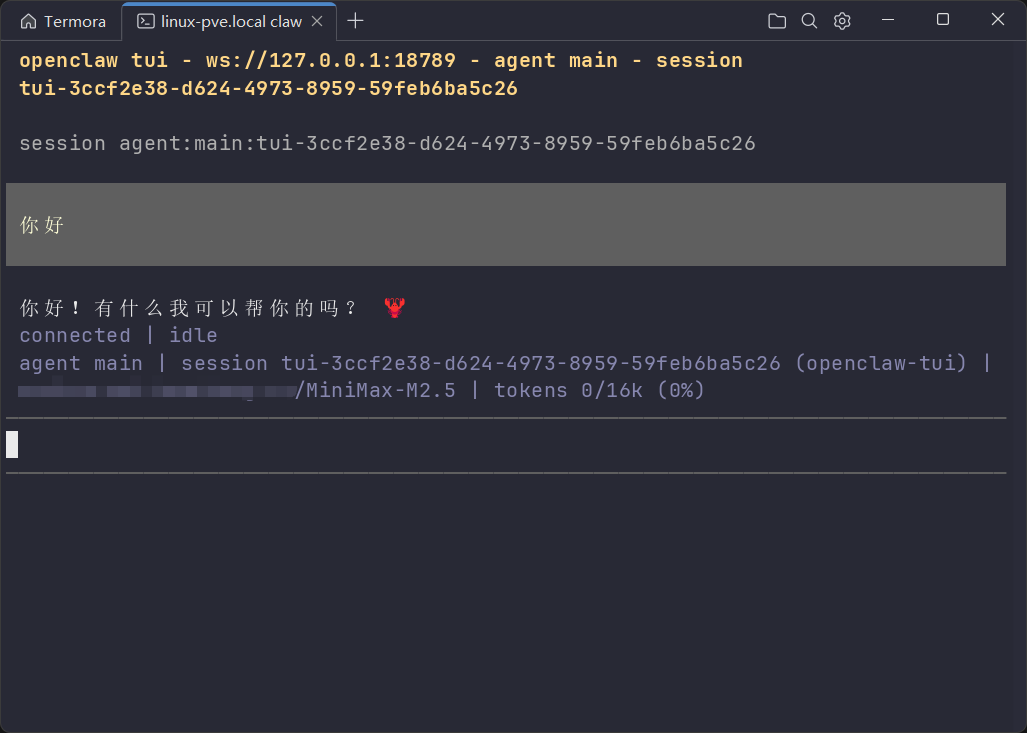
打开 openclaw tui,和龙虾打个招呼:

OpenClaw 终端

可以看到请求已经被捕获了:

mitmweb

提示词

完整的请求内容太长,放 GitHub Gist 上面了。

先来看一下 system prompt 的部分,洋洋洒洒 2 万多个字符。主要包括的内容有:

  • 所有 agent tools 介绍和用法
  • 所有 skills 介绍和如何获取使用 skills
  • 记忆的获取方法、配置更新方法、官方文档在哪、如何回复消息、如何群聊等等
  • 工作区内容,也就是 workspace 目录下 AGENTS.md、SOUL.md 等等几个文档的内容

接下来是聊天内容:

1
2
3
4
5
6
7
8
9
10
```json
{
"label": "openclaw-tui (gateway-client)",
"id": "gateway-client",
"name": "openclaw-tui",
"username": "openclaw-tui"
}
```

[Fri 2026-03-13 00:14 GMT+8] 你好

再接下来是工具列表。可以看到工具是用 OpenAI 接口的 function calling 功能来实现的。这就是 OpenClaw 文档 中所谓的「first-class agent tools」。

1
2
3
4
5
6
7
8
9
10
11
12
13
14
15
16
17
18
19
20
21
22
23
24
25
26
27
28
29
30
31
32
33
34
35
// 其中一个工具
{
"tools": [
{
"type": "function",
"function": {
"name": "read",
"description": "Read the contents of a file. Supports text files and images (jpg, png, gif, webp). Images are sent as attachments. For text files, output is truncated to 2000 lines or 50KB (whichever is hit first). Use offset/limit for large files. When you need the full file, continue with offset until complete.",
"parameters": {
"type": "object",
"required": [],
"properties": {
"path": {
"description": "Path to the file to read (relative or absolute)",
"type": "string"
},
"offset": {
"description": "Line number to start reading from (1-indexed)",
"type": "number"
},
"limit": {
"description": "Maximum number of lines to read",
"type": "number"
},
"file_path": {
"description": "Path to the file to read (relative or absolute)",
"type": "string"
}
}
},
"strict": false
}
}
]
}

响应

响应内容是流式的,取最后一条内容:

1
2
3
4
5
6
7
8
9
10
11
12
13
14
15
16
17
18
19
20
21
22
23
24
25
26
27
28
29
30
31
32
{
"id": "0602d7448993a22d14e868b14524fb08",
"choices": [
{
"finish_reason": "stop",
"index": 0,
"message": {
"content": "你好!有什么我可以帮你的吗? 🦞",
"role": "assistant",
"name": "MiniMax AI",
"audio_content": "",
"reasoning_content": "The user said \"你好\" which means \"Hello\" in Chinese. This is a simple greeting. I should respond naturally in Chinese since that's the language they used.\n\nLooking at the context:\n- This is a webchat direct message\n- The user is Xiaoming (from USER.md)\n- Timezone is Asia/Shanghai\n- It's Friday, March 13, 2026\n\nI should greet them back warmly but simply.",
"reasoning_details": [
// ...
]
}
}
],
"created": 1773380676,
"model": "MiniMax-M2.5",
"object": "chat.completion",
"usage": {
"total_tokens": 14046,
"total_characters": 0,
"prompt_tokens": 13944,
"completion_tokens": 102,
"completion_tokens_details": {
"reasoning_tokens": 90
}
},
// ...
}

结尾有使用量计数。14046 个 token,好家伙,来计算一下花了多少钱。根据文档计算得到的价格为——

\[ \frac{13944 \times 2.1 + 102 \times 8.4}{10^{6}} = 0.0301392 \]

3 分钱。这部分主要都是提示词的消耗,也就是说每一次对话都是 3 分钱打底了,叠加上历史记录会更多。

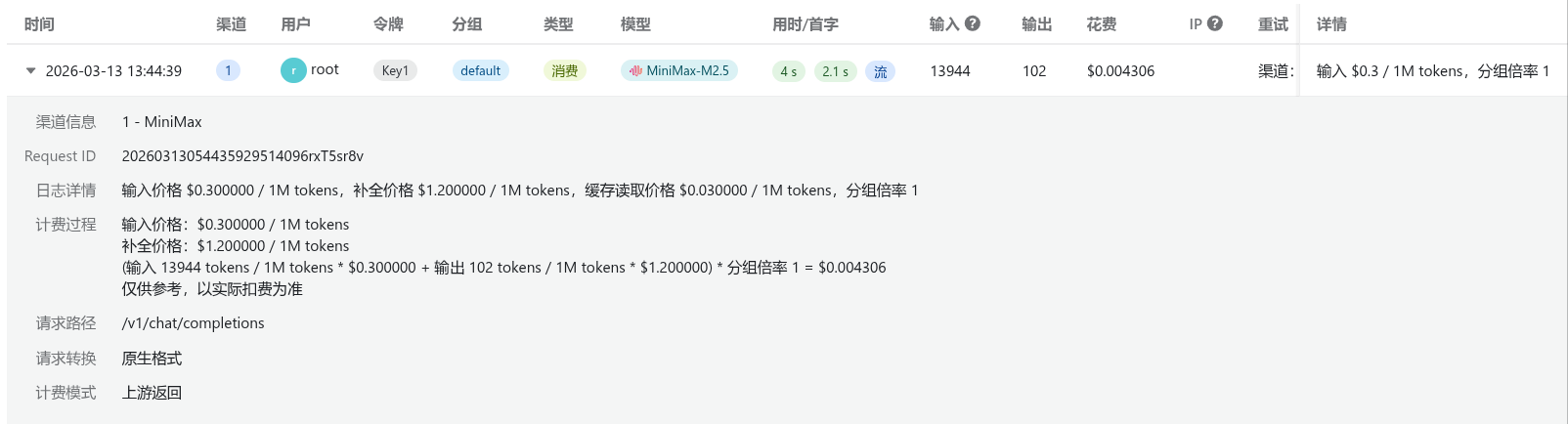
如果在 new-api 里维护了模型价格,也可以在日志里面看到用量。

new-api 日志页面

利用 MITM 获取 LLM 应用的提示词

https://blog.beanbang.cn/2026/03/12/mitm-llm-prompt-sniffing/

作者

Lazyb0x

发布于

2026-03-12

更新于

2026-03-13

许可协议

评论